DIGITAL REALTY CASE STUDY
CASE STUDY
Setting the Benchmark for Data Center Map UX
Setting the Benchmark for Data Center Map UX
www.digitalrealty.com
This project focused on design craft and scalable documentation. I expanded the component library, created a coherent IA structure, and wrote async handoff specs that enabled the development team to build the updated map to spec in one round in 2024, and content authors to scale the updated website post-launch in 2023 without design bottlenecks. Below are direct links to the foundational documentation I built and maintain:
🔗 Metro Map Documentation (PDF) → IA, IxD rules, AC, and dev specs
🔗 Content Author Guidelines (Figma) → Website component anatomy, design specs, copy rules, tone of voice, and usage patterns
———
Digital Realty's website serves over a million unique visitors annually, many of whom are prospective customers evaluating where to colocate critical infrastructure.
The global and metro map experience is one of the highest-traffic paths on the site. Before our redesign, there was no clear path from region to metro to facility, nor was there a visual distinction between facilities within the same building. The site elements were limited in their interactivity, and the path felt dead. There was a longstanding problem no one was taking on which was overlapping facilities living inside the same building, the same data in the backend, shown as overlapped nonsense on the map. No one wanted to touch it. I chose this initiative independent of any product demands upstream and executed the end-to-end improvement using novel interaction patterns and linked components in a way that amplified meaning across them.
Bottom line: The experience wasn't supporting the sales funnel the way it needed to. I led the redesign of the entire Global and Metro map experiences, end-to-end from discovery to launch and beyond. The result? Form conversion rates in the locations experience jumped 333%, PDF download conversion rates increased up to 456%, and we created a design pattern good enough to be copied nearly verbatim by competitors. This project taught me how to inspire a team to deliver at maximum efficiency while enjoying the process. Yeah, we had fun.
Jump to results ↓
.
.
.
This project focused on design craft and scalable documentation. I expanded the component library, created a coherent IA structure, and wrote async handoff specs that enabled the development team to build the updated map to spec in one round in 2024, and content authors to scale the updated website post-launch in 2023 without design bottlenecks. Below are direct links to the foundational documentation I built and maintain:
🔗 Metro Map Documentation (PDF) → IA, IxD rules, AC, and dev specs
🔗 Content Author Guidelines (Figma - Desktop) → Website component anatomy, design specs, copy rules, tone of voice, and usage patterns
———
Digital Realty's website serves over a million unique visitors annually, and many are prospective customers evaluating where to colocate critical infrastructure.
The global and metro map experience is one of the highest-traffic paths on the site. Before this redesign, there was no clear path from region to metro to facility, nor was there a visual distinction between facilities within the same building. The site elements were limited in their interactivity, and the path felt dead.
There was a longstanding problem no one was taking on which was overlapping facilities living inside the same building, the same data in the backend, shown as overlapped nonsense on the map. No one wanted to touch it. I chose this initiative independent of any product demands upstream and executed the end-to-end improvement using novel interaction patterns and linked components in a way that amplified meaning across them.
Bottom line: The experience wasn't supporting the sales funnel the way it needed to. I led the redesign of the entire Global and Metro map experiences, end-to-end from discovery to launch and beyond. The result? Form conversion rates in the locations experience jumped 333%, PDF download conversion rates increased up to 456%, and we created a design pattern good enough to be copied nearly verbatim by competitors. This project taught me how to inspire a team to deliver at maximum efficiency while enjoying the process. Yeah, we had fun.
.
.
.
Above: The Global and Metro Map redesign shown on the live site circa February, 2026
Problem: The Broken Funnel
Digital Realty operates 300+ data center facilities across 55+ metros on six continents. The website's map experience is where many prospective customers first explore the data center portfolio — identifying a region, narrowing to a metro, and ultimately finding the right facility for their needs. The journey should feel intuitive.
When I joined the team, there was an existing map which had been built without a cohesive information architecture to guide the user forward. If someone navigated futher into the map they would reach a dead end at a small dot that didn't connect to any metro or facility page. Each metro group was labelled only by numbers, and it wasn't possible to navigate straight from the global map into the existing metro pages. In the mobile version, the data center facilities shown were clustered, overlapping, and unable to be clearly identified.
Below: "Before" images of the Global and Metro Map experiences - www.digitalrealty.com circa early 2023. The Global Map included clusters of numbers which symbolized metros and facilities within each metro, but there was no link between worlds to go from the Global to Metro to Facility level.
Problem: The Broken Funnel
Digital Realty operates 300+ data center facilities across 55+ metros on six continents. The website's map experience is where many prospective customers first explore the data center portfolio — identifying a region, narrowing to a metro, and ultimately finding the right facility for their needs. The journey should feel intuitive.
When I joined the team, there was an existing map which had been built without a cohesive information architecture to guide the user forward. If someone navigated futher into the map they would reach a dead end at a small dot that didn't connect to any metro or facility page. Each metro group was labelled only by numbers, and it wasn't possible to navigate straight from the global map into the existing metro pages. In the mobile version, the data center facilities shown were clustered, overlapping, and unable to be clearly identified.
Below: "Before" images of the Global and Metro Map experiences - www.digitalrealty.com circa early 2023. The Global Map included clusters of numbers which symbolized metros and facilities within each metro, but there was no link between worlds to go from the Global to Metro to Facility level.

Discovery: Understanding where users got lost
I researched Hotjar session recordings to observe how users were interacting with the maps in real time. What I saw confirmed and expanded on the problems I'd identified through my own experience in navigating them: Many users were zooming in and out in frustration, navigating back and forth quickly between the Global map and previous pages, eventually abandoning the Global map without moving ahead to metro or facility pages.
During a recorded Northern Virginia session on desktop, a user landed on the Metro map and there encountered several facilities overlapping. To distinguish between facilities and note their exact locations, the user needed to repeatedly zoom in and out. They then hovered over the facility list, but navigated away from it quickly — likely because the list had no interaction whatsoever. Nothing happened on hover. The list and the map were two separate, unlinked elements on the same page.
Northern Virginia is one of Digital Realty's densest metro with 15+ facilities in close proximity. If the experience broke down there, it was breaking down everywhere that had facility density.
I also pulled device analytics to understand the audience. The data showed a roughly even split between mobile and desktop: 52.1% mobile, 44.6% desktop, and 3.3% tablet. This meant that any solution had to work equally well across devices — hover-based interactions for desktop users and tap-based interactions for the mobile majority. A desktop-only solution would fail more than half the audience, and at this point in development most of the website had been developed with priority given to desktop users.
Below: Images from HotJar sessions showing users interacting with the Metro Map before redesign; Desktop (left) and Mobile (right), with links to source HotJar sessions
Discovery: Understanding where users got lost
I researched Hotjar session recordings to observe how users were interacting with the maps in real time. What I saw confirmed and expanded on the problems I'd identified through my own experience in navigating them: Many users were zooming in and out in frustration, navigating back and forth quickly between the Global map and previous pages, eventually abandoning the Global map without moving ahead to metro or facility pages.
During a recorded Northern Virginia session on desktop, a user landed on the Metro map and there encountered several facilities overlapping. To distinguish between facilities and note their exact locations, the user needed to repeatedly zoom in and out. They then hovered over the facility list, but navigated away from it quickly — likely because the list had no interaction whatsoever. Nothing happened on hover. The list and the map were two separate, unlinked elements on the same page.
Northern Virginia is one of Digital Realty's densest metro with 15+ facilities in close proximity. If the experience broke down there, it was breaking down everywhere that had facility density.
I also pulled device analytics to understand the audience. The data showed a roughly even split between mobile and desktop: 52.1% mobile, 44.6% desktop, and 3.3% tablet. This meant that any solution had to work equally well across devices — hover-based interactions for desktop users and tap-based interactions for the mobile majority. A desktop-only solution would fail more than half the audience, and at this point in development most of the website had been developed with priority given to desktop users.
Below: Images from HotJar sessions showing users interacting with the Metro Map before redesign; Desktop (left) and Mobile (right), with links to source HotJar sessions
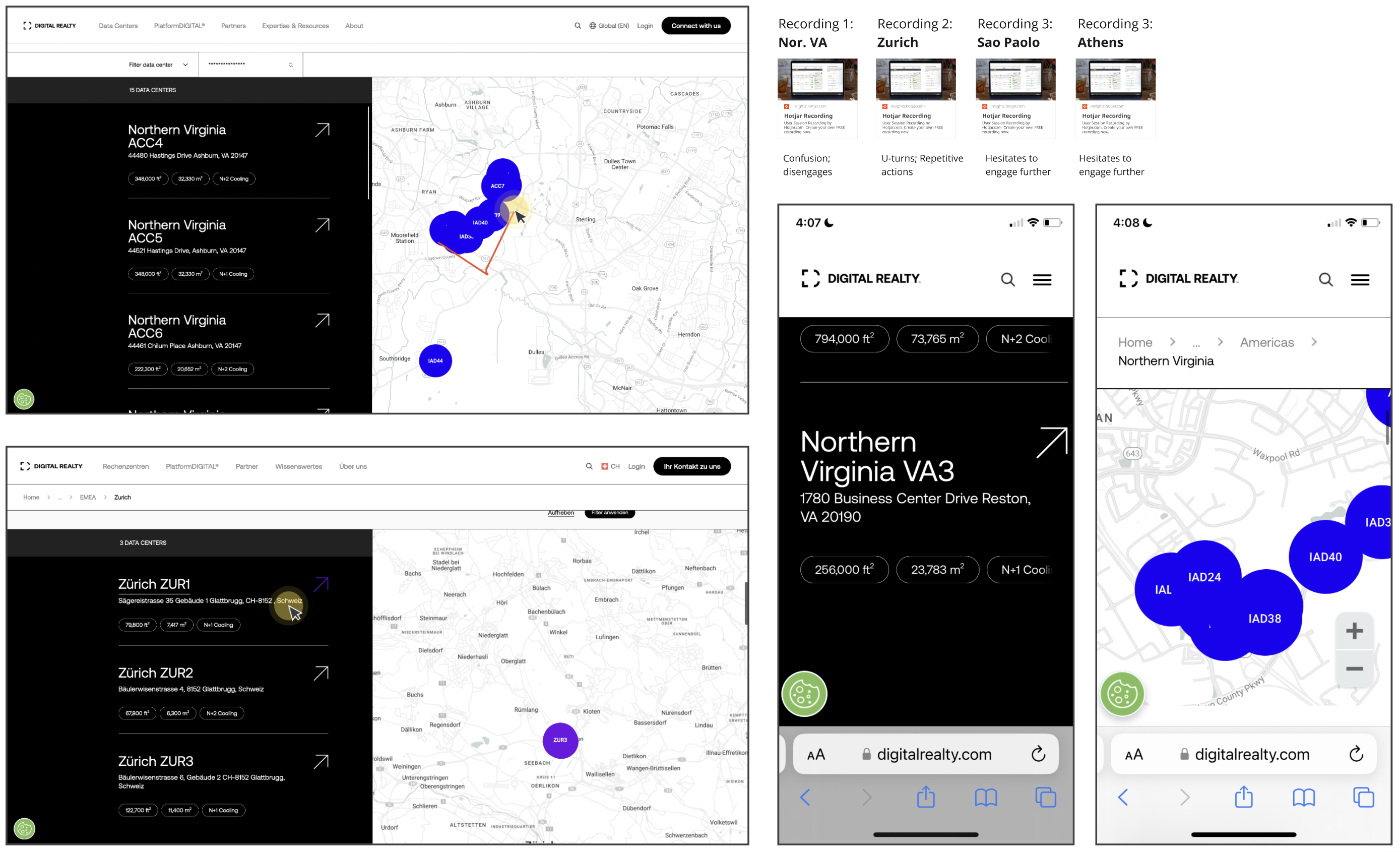
Above: A "before" view of the map experiences on desktop and mobile. Hotjar allowed me to see how the experience was dropping for our users.
Defining Success, Phase 1: Global Map Redesign
Before moving into design, I articulated what the redesigned experience needed to achieve: Product outcomes tied to business goals.
The map experience should mirror the actual decision-making journey of a data center buyer: region → metro → facility. Every interaction should provide immediate visual feedback that confirms where the user is and where they can go next. On mobile, the experience should work within the constraints of a small screen without trapping people. I determined that the list and the map should function as a single linked system, not two adjacent but unrelated components.
The target metric: Conversion rates. Were users who engaged with the map actually reaching facility pages and taking meaningful action, like filling out a contact form or downloading a spec sheet? If the redesign was successful, I expected to see conversion rates climb even if raw traffic didn't.
The Global Map Solution
www.digitalrealty.com/data-centers
I designed a layered zoom hierarchy with global access at each level, threading everything through a deliberate sequence with quick nav buttons automatically panning between continents/countries. For example, clicking into the Americas presents a choice between North America and South America; Each choice lands to show all of the metros in that continent or country, preventing information overload.
Below: A prototype simulation of the Global Map design developed in Figma
Defining Success, Phase 1: Global Map Redesign
Before moving into design, I articulated what the redesigned experience needed to achieve: Product outcomes tied to business goals.
The map experience should mirror the actual decision-making journey of a data center buyer: region → metro → facility. Every interaction should provide immediate visual feedback that confirms where the user is and where they can go next. On mobile, the experience should work within the constraints of a small screen without trapping people. I determined that the list and the map should function as a single linked system, not two adjacent but unrelated components.
The target metric: Conversion rates. Were users who engaged with the map actually reaching facility pages and taking meaningful action, like filling out a contact form or downloading a spec sheet? If the redesign was successful, I expected to see conversion rates climb even if raw traffic didn't.
The Global Map Solution
I designed a layered zoom hierarchy with global access at each level, threading everything through a deliberate sequence with quick nav buttons automatically panning between continents/countries. For example, clicking into the Americas presents a choice between North America and South America; Each choice lands to show all of the metros in that continent or country, preventing information overload.
Below: A prototype simulation of the Global Map design developed in Figma
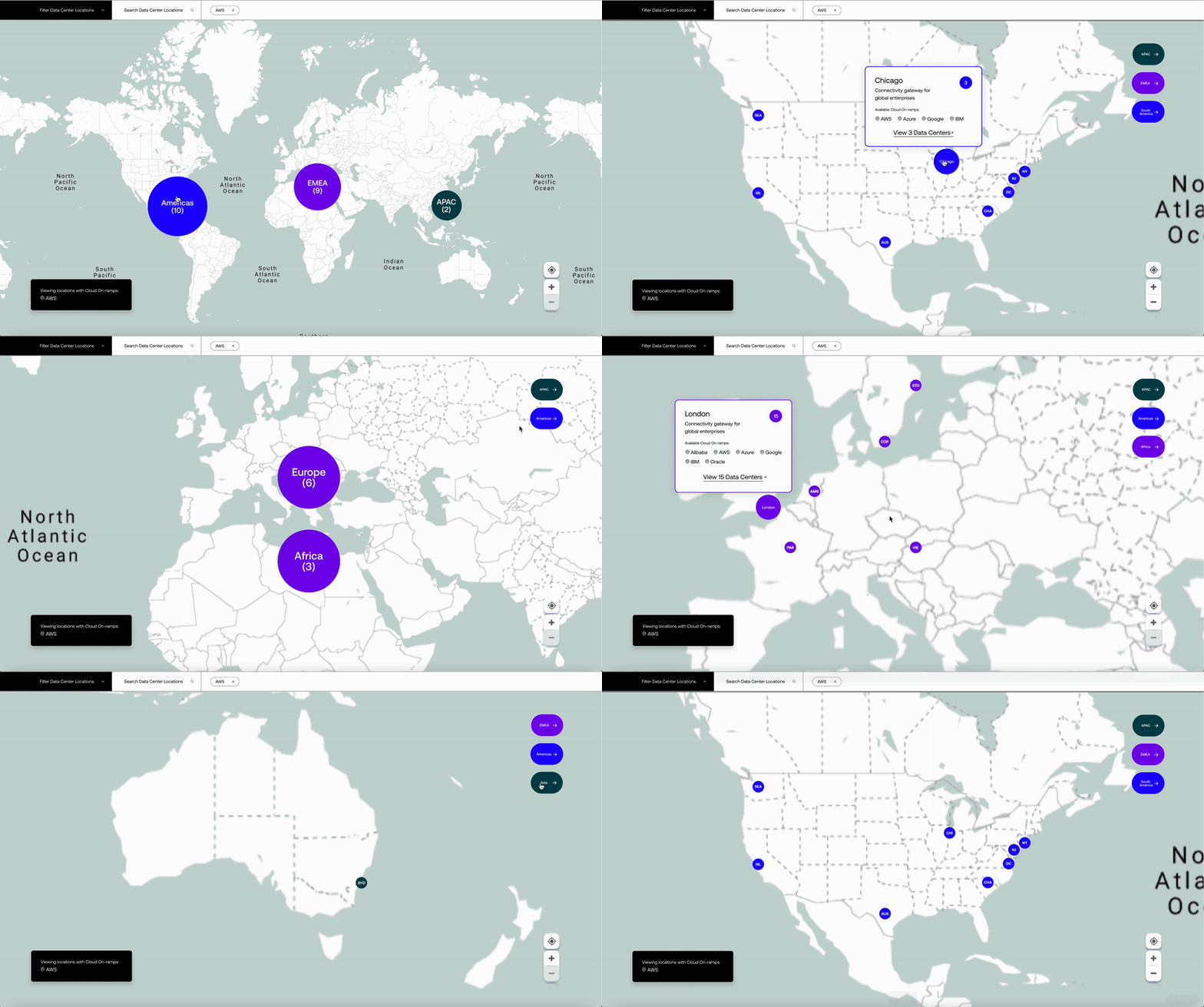
The animations were important. Easing in and out of each zoom level helps users maintain spatial orientation —they always know where they are in relation to the whole. Without those transitions, jumping between zoom levels would feel disorienting, especially for users who aren't already familiar with Digital Realty's global footprint. Plus, animation makes it snappy and fun.
The most critical design component here was the metro popup. Hovering over a metro marker on desktop (or tapping once on mobile) now surfaces a card with the metro name, a brief description, the number of data centers in that metro, potential cloud on-ramps via a filter, and a clear call to action: "View [X] Data Centres →". This was the missing link in the funnel. Before this redesign, there was no mechanism to get from the global map to a metro page. Now there's an explicit, prompted transition that guides users to exactly where they need to go, giving them information about available cloud onramps if they so choose.
Design details that matter
Each metro marker now displays a two to three-letter code (CHI for Chicago, DAL for Dallas, NV for Northern Virginia) instead of raw facility counts. This made the map scannable at a glance — users could identify metros by name rather than trying to decode what a number on a dot meant.
The region buttons use distinct colors tied to Digital Realty's brand palette — blue (#1F00FF) for Americas, purple (#7700EC) for EMEA, and slate (#01454F) for APAC — creating a visual system with contrast that carries through the rest of the site.
The zoom controls were positioned to avoid conflicts with mobile scroll behavior, solving the problem of users getting trapped inside the map.
Phase II: Metro Map Redesign
With the Global map funneling users into metro pages effectively, the Metro map became the next set of problems to solve. The Metro map is where deeper evaluation actually happens — users compare facilities, check specs, and decide which locations to explore further. This was where many facilities in dense metro areas were overlapping and hard to distinguish.
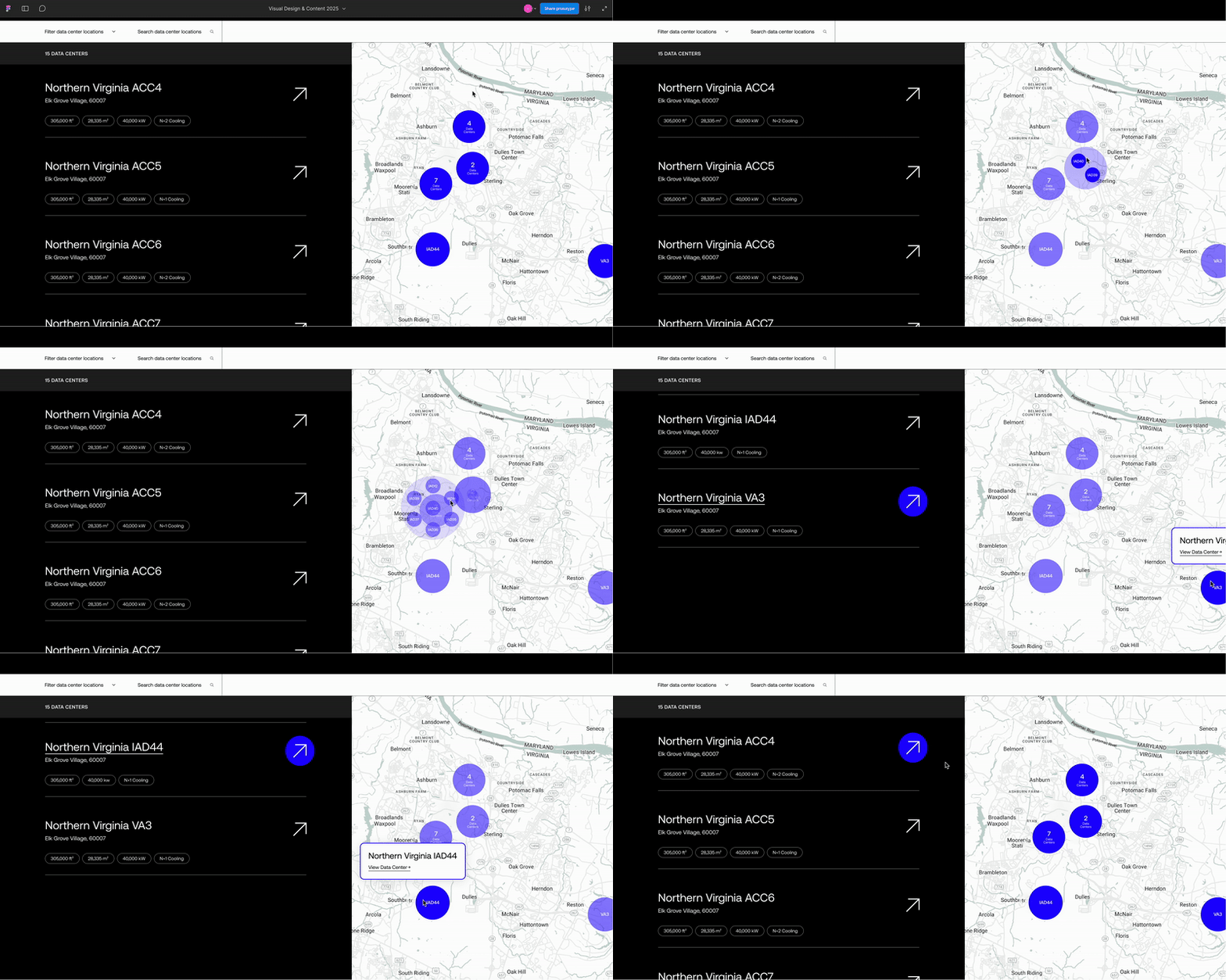
Designed solution for overlapping facility data (below): A cluster of facilities, listed number, that expands on hover to reveal each facility within that building/site. This was our saving grace and it laid the foundation to make the whole Metro Map solution work.
The animations were important. Easing in and out of each zoom level helps users maintain spatial orientation —they always know where they are in relation to the whole. Without those transitions, jumping between zoom levels would feel disorienting, especially for users who aren't already familiar with Digital Realty's global footprint. Plus, animation makes it snappy and fun.
The most critical design component here was the metro popup. Hovering over a metro marker on desktop (or tapping once on mobile) now surfaces a card with the metro name, a brief description, the number of data centers in that metro, potential cloud on-ramps via a filter, and a clear call to action: "View [X] Data Centres →". This was the missing link in the funnel. Before this redesign, there was no mechanism to get from the global map to a metro page. Now there's an explicit, prompted transition that guides users to exactly where they need to go, giving them information about available cloud onramps if they so choose.
Design details that matter
Each metro marker now displays a two to three-letter code (CHI for Chicago, DAL for Dallas, NV for Northern Virginia) instead of raw facility counts. This made the map scannable at a glance — users could identify metros by name rather than trying to decode what a number on a dot meant.
The region buttons use distinct colors tied to Digital Realty's brand palette — blue (#1F00FF) for Americas, purple (#7700EC) for EMEA, and slate (#01454F) for APAC — creating a visual system with contrast that carries through the rest of the site.
The zoom controls were positioned to avoid conflicts with mobile scroll behavior, solving the problem of users getting trapped inside the map.
Phase II: Metro Map Redesign
With the Global map funneling users into metro pages effectively, the Metro map became the next set of problems to solve. The Metro map is where deeper evaluation actually happens — users compare facilities, check specs, and decide which locations to explore further. This was where many facilities in dense metro areas were overlapping and hard to distinguish.
Designed solution for overlapping facility data (below): A cluster of facilities, listed number, that expands on hover to reveal each facility within that building/site. This was our saving grace and it laid the foundation to make the whole Metro Map solution work.
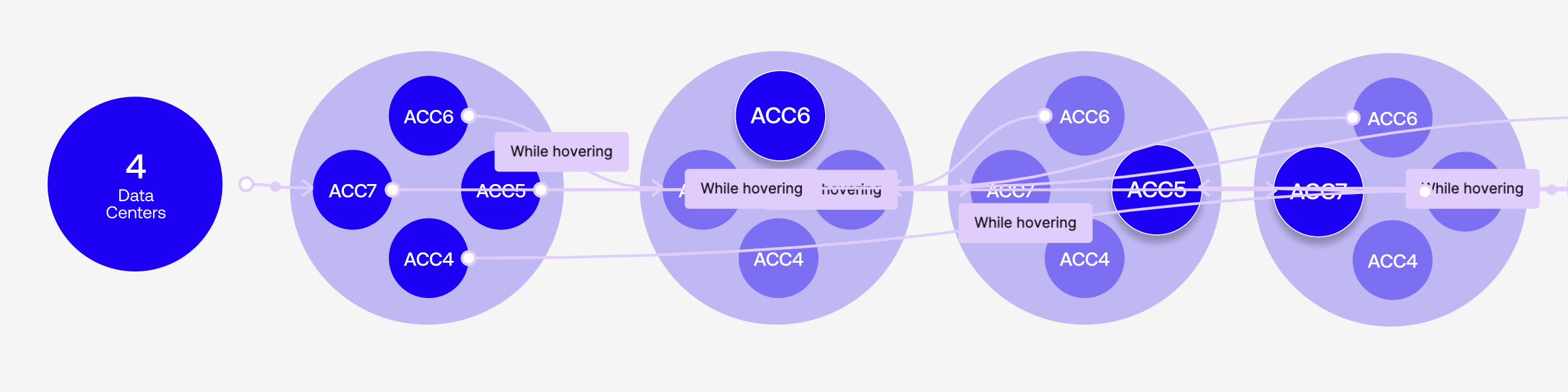
Paint point hypothesis:
"Confusing visual design - Overlapping facilities on map due to the sites living in the same building - and a lack of interactivity between the facility list and the Metro map leads users to spend more time navigating back and forth between locations. The lack of an intermediate step that confirms the user is about to navigate to a new page upon click of a facility marker leads to unexpected navigation outcomes."
Documenting a 'source of truth'
After defining the problem and designing the solution (the Metro map was designed in collaboration with Rocket Source), I wrote the design specification which served as the main source of truth for our development team. This included detailed user stories, acceptance criteria, platform-specific behaviors, and edge cases, structured so that a developer could build from it in conjunction with our lean prototype with nearly zero ambiguity.
Below: Technical spec sheet including detailed imagery and acceptance criteria, written in Confluence
Paint point hypothesis:
"Confusing visual design - Overlapping facilities on map due to the sites living in the same building - and a lack of interactivity between the facility list and the metro map leads users to spend more time navigating back and forth between locations. The lack of an intermediate step that confirms the user is about to navigate to a new page upon click of a facility marker leads to unexpected navigation outcomes."
Documenting a 'source of truth'
After defining the problem and designing the solution (the Metro map was designed in collaboration with Rocket Source), I wrote the design specification which served as the main source of truth for our development team. This included detailed user stories, acceptance criteria, platform-specific behaviors, and edge cases, structured so that a developer could build from it in conjunction with our lean prototype with nearly zero ambiguity.
Below: Technical spec sheet including detailed imagery and acceptance criteria, written in Confluence
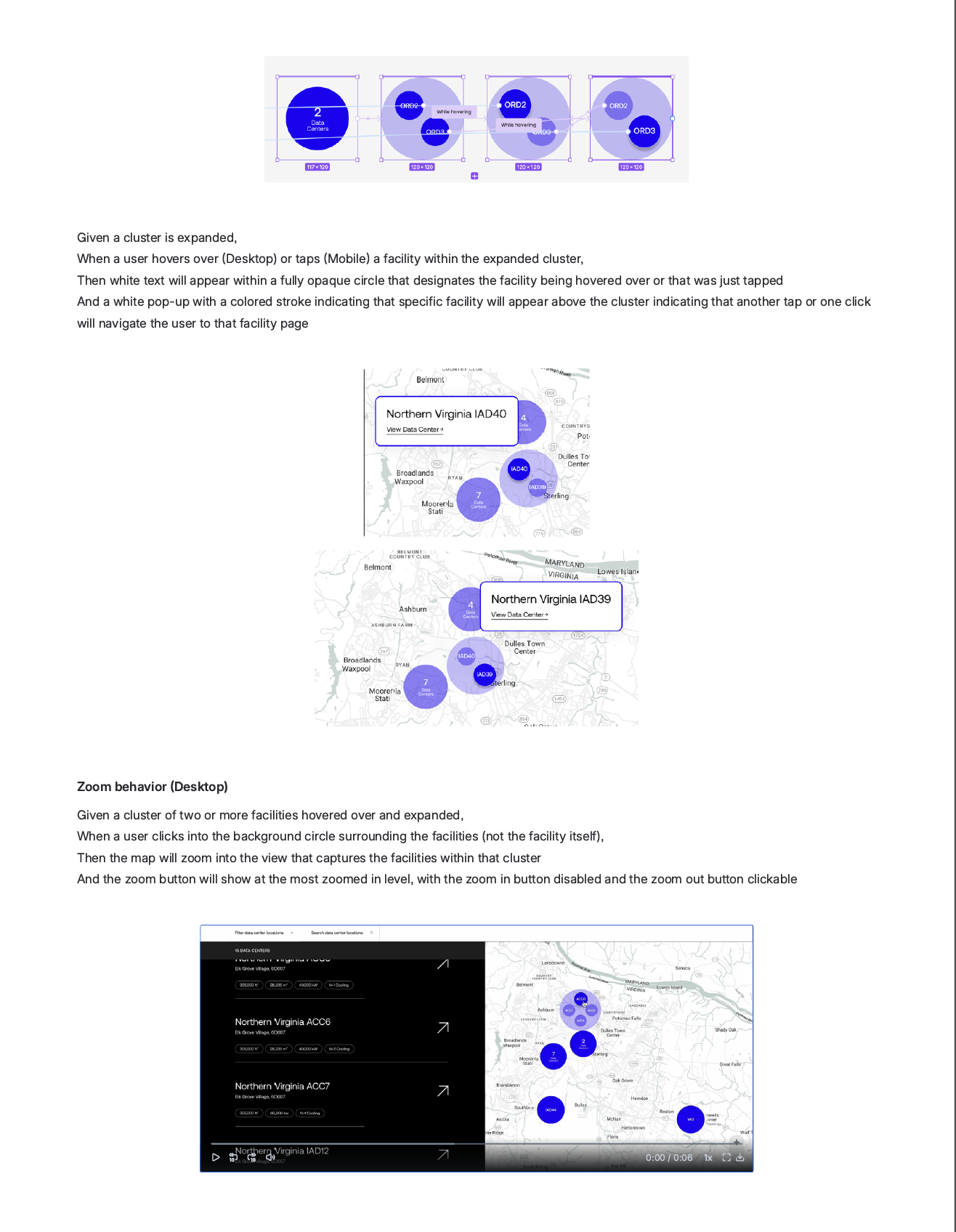
Phase II:The spec covered every interaction state across desktop and mobile: on-load defaults, list-to-map linking behavior, facility-to-list linking behavior, cluster expansion and collapse, zoom behavior at each level, and the handling of dense clusters with 10+ facilities (which required a nested cluster pattern — expanding to show 8 facilities around an inner cluster that could be tapped to reveal more).
I wrote this as a Confluence page with embedded Figma prototypes and screen recordings demonstrating each interaction. It became the reference document for the entire team — viewed by 12 team members, with several developers returning to it dozens of times during implementation. One developer viewed it 47 times.

The Metro Map Solution
www.digitalrealty.com/data-centers/americas/northern-virginia
Result: The feature was implemented almost exactly to spec, requiring only 1-2 minor adjustments during the entire development process. Near-zero rework. This level of precision saved engineering time, avoided costly iteration loops, and meant we shipped ahead of schedule.
Below: A prototype simulation of the Metro Map created in Figma in collaboration with RocketSource
The spec covered every interaction state across desktop and mobile: on-load defaults, list-to-map linking behavior, facility-to-list linking behavior, cluster expansion and collapse, zoom behavior at each level, and the handling of dense clusters with 10+ facilities (which required a nested cluster pattern — expanding to show 8 facilities around an inner cluster that could be tapped to reveal more).
I wrote this as a Confluence page with embedded Figma prototypes and screen recordings demonstrating each interaction. It became the reference document for the entire team — viewed by 12 team members, with several developers returning to it dozens of times during implementation. One developer viewed it 47 times.
The Metro Map Solution
The result: The feature was implemented almost exactly to spec, requiring only 1-2 minor adjustments during the entire development process. Near-zero rework. This level of precision saved engineering time, avoided costly iteration loops, and meant we shipped ahead of schedule.
Below: A prototype simulation of the Metro Map created in Figma in collaboration with RocketSource
Mobile Solution
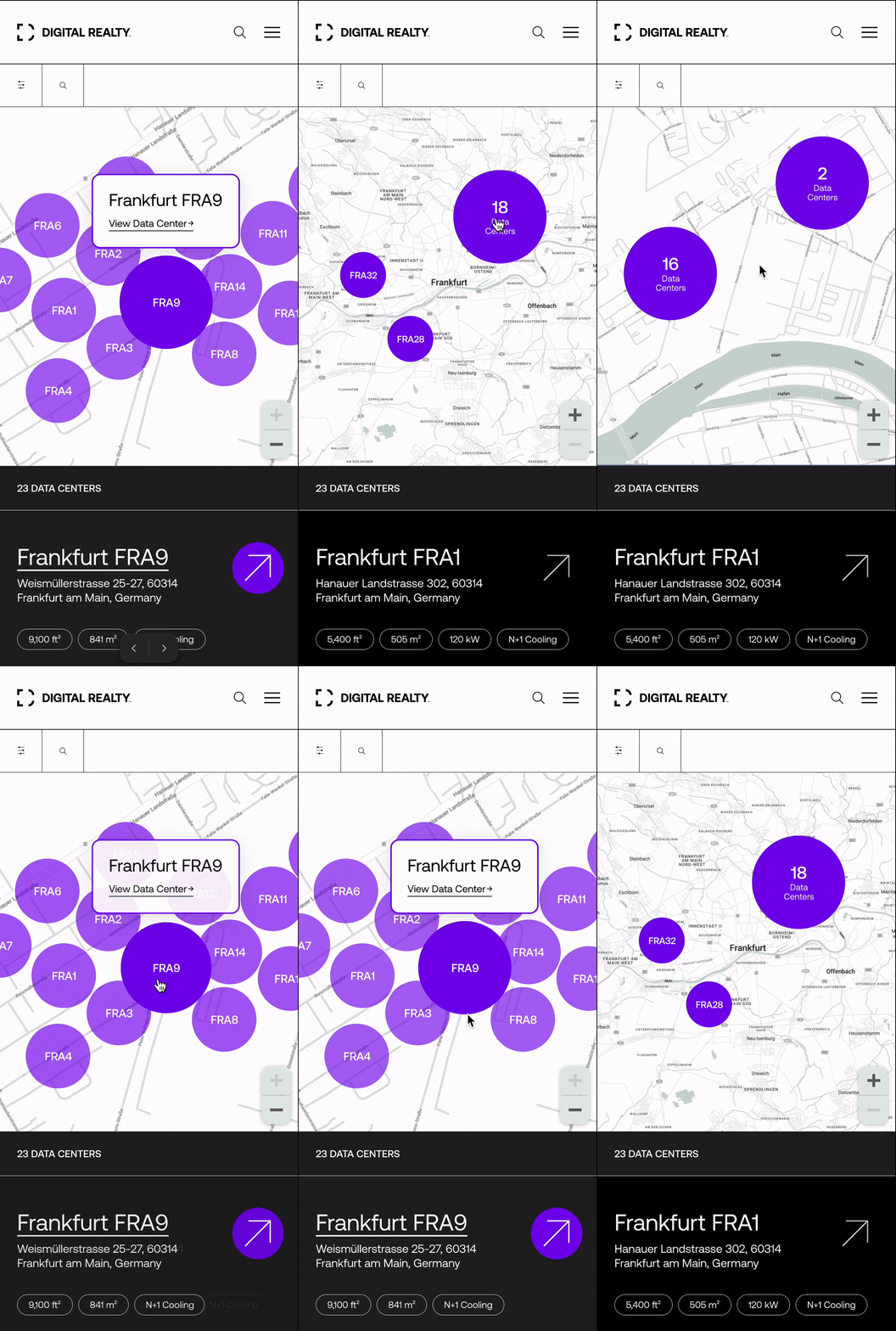
Analytics showed 52.1% of our users on mobile devices during this redesign. Designing a top-level mobile experience was as important as the desktop version to make a positive first impression with our user base. Since there's no hover state on touch devices, we designed around the tap.
Tapping a facility in the list brings it to the top of the list view, highlights its marker on the map (changing from transparent to fully opaque), and pans the map to center on it. If the facility is within a cluster, the cluster expands on tap to reveal individual markers. Tapping a single facility marker surfaces a popup with the facility name and a "View Data Center →" link — the same intermediate confirmation step that was missing in the previous design. This step was a deliberate product decision. In the old mobile experience, tapping a facility marker immediately navigated users to a new page. There was no way to confirm it was the right facility before leaving the page. Users who tapped the wrong overlapping marker, which is easy to do in dense metros on a small screen, had to come back and try again. The popup eliminates that friction entirely.
For clusters with 10 or more facilities, we designed a nested expansion pattern: The first tap expands to show 8 facilities arranged around an inner cluster indicator. Tapping the inner cluster zooms into the remaining facilities. Tapping outside of an expanded cluster collapses it. These behaviors were specified down to the interaction level in the acceptance criteria, which is why the mobile implementation shipped cleanly.
Below: Mobile version (Figma prototype) of the Metro Map experience
The most important outcome of this two-phase redesign isn't any single feature but the connected path that now exists from the very top of the funnel to the very bottom.
Before: Global map → dead end
Users had to find metro pages through site navigation or search.
After: Global map → region selection → continent/country view → metro popup → metro page with linkedfacility list and map → facility popup → individual facility page
Every step provides visual feedback.
Every transition is animated to maintain spatial context.
Every interaction has a clear next step, and the user is never stranded.
This connected experience exists because I owned both phases of the work and designed the metro map to extend the patterns established in the global map:
· Consistent marker styling
· Consistent popup behavior
· Consistent animation language
· Consistent regional color coding
A different designer working on Phase 2 without the context of Phase 1 would likely have created something functional yet less connected.
The cohesion is part of the product's success.
Results
I used the Global Map and Northern Virginia location — remember it's one of Digital Realty's densest metros — to analyze the difference year over year (2023 vs. 2024) for the same time period (September 30 –October 31) in how users engaged with the experiences before and after the global and metro map updates were complete and live on the site.
Global Map Experience
Form conversion rate:
Jumped from 0.03% to 0.13%, a 333% increase
· total users dropped from 6.3K to 4.6K
· contacts more than doubled from 4 to 9
Northern Virginia Metro Map Experience
Form conversion rate:
Jumped from 0.00% to 0.28%,
· new conversion behavior that didn't exist before redesign
PDF downloads conversion rate:
Rose from 3.18% to 9.66%, a 204% increase
· total users dropping from 570 to 451
Northern Virginia IAD12 Facility Page
PDF download conversion rate:
Rose from 4.72% to 26.23%, a 456% increase
· total users essentially flat
Summary:
↑ 333% Form conversion on the global map
↑ 204% PDF conversion for Northern Virginia
↑ 456% PDF conversion on the IAD12 facility page
Traffic dropped. Conversions climbed.
What the numbers mean
The drop in total users with a simultaneous spike in conversions is the most telling signal. Fewer people were visiting, but the people who did visit were dramatically more likely to take meaningful action — filling out contact forms, downloading facility spec sheets, navigating deeper into the site. The redesigned experience wasn't just more polished, it was structurally sound and more effective at qualifying and converting the right audience.
The downstream impact on facilities pages is equally significant. The metro map update didn't just improve the metro experience, it improved everything below it in the funnel. By creating clear, linked navigation from the metro map to individual facility pages, users arriving at those pages were more intentional and more engaged. They weren't landing there by accident; They'd been guided there by a coherent experience.
Post-deployment Hotjar recordings confirmed the behavioral shift. Users were engaging with the metro map interactivity, hovering to highlight, expanding clusters, using the popups to navigate — and arriving at facility pages with clear intent. The back-and-forth navigation pattern I'd observed in the original recordings was largely gone.
Shipping precision
Beyond the user-facing metrics, the process itself was a success story. The metro map spec I authored served as the definitive reference for development, with 12 team members relying on it throughout implementation. The feature shipped almost exactly to design spec, requiring only 1-2 minor changes — near-zero rework. That precision translated directly into saved engineering hours, no costly iteration loops, and an on-time launch.
.
Results
I used the Global Map and Northern Virginia location — remember it's one of Digital Realty's densest metros — to analyze the difference year over year (2023 vs. 2024) for the same time period (September 30 –October 31) in how users engaged with the experiences before and after the global and metro map updates were complete and live on the site.
Global Map Experience
Form conversion rate:
Jumped from 0.03% to 0.13%, a 333% increase
· total users dropped from 6.3K to 4.6K
· contacts more than doubled: 4 to 9
Northern Virginia Map
Form conversion rate:
Jumped from 0.00% to 0.28%,
· new conversion behavior that didn't exist before redesign
PDF downloads conversion rate:
Rose from 3.18% to 9.66%, a 204% increase
· total users dropping from 570 to 451
Northern Virginia IAD12 Facility Page
PDF download conversion rate:
Rose from 4.72% to 26.23%, a 456% increase
· total users essentially flat
Summary:
↑ 333% Form conversion on the Global Map
↑ 204% PDF conversion for Northern Virginia
↑ 456% PDF conversion on the IAD12 facility page
Traffic dropped. Conversions climbed.
What the numbers mean
The drop in total users with a simultaneous spike in conversions is the most telling signal. Fewer people were visiting, but the people who did visit were dramatically more likely to take meaningful action — filling out contact forms, downloading facility spec sheets, navigating deeper into the site. The redesigned experience wasn't just more polished, it was structurally sound and more effective at qualifying and converting the right audience.
The downstream impact on facilities pages is equally significant. The metro map update didn't just improve the metro experience, it improved everything below it in the funnel. By creating clear, linked navigation from the metro map to individual facility pages, users arriving at those pages were more intentional and more engaged. They weren't landing there by accident; They'd been guided there by a coherent experience.
Post-deployment Hotjar recordings confirmed the behavioral shift. Users were engaging with the metro map interactivity, hovering to highlight, expanding clusters, using the popups to navigate — and arriving at facility pages with clear intent. The back-and-forth navigation pattern I'd observed in the original recordings was largely gone.
Shipping precision
Beyond the user-facing metrics, the process itself was a success story. The metro map spec I authored served as the definitive reference for development, with 12 team members relying on it throughout implementation. The feature shipped almost exactly to design spec, requiring only 1-2 minor changes — near-zero rework. That precision translated directly into saved engineering hours, no costly iteration loops, and an on-time launch.
Industry Validations
One of the strongest signals that a product decision is right is when the industry follows.
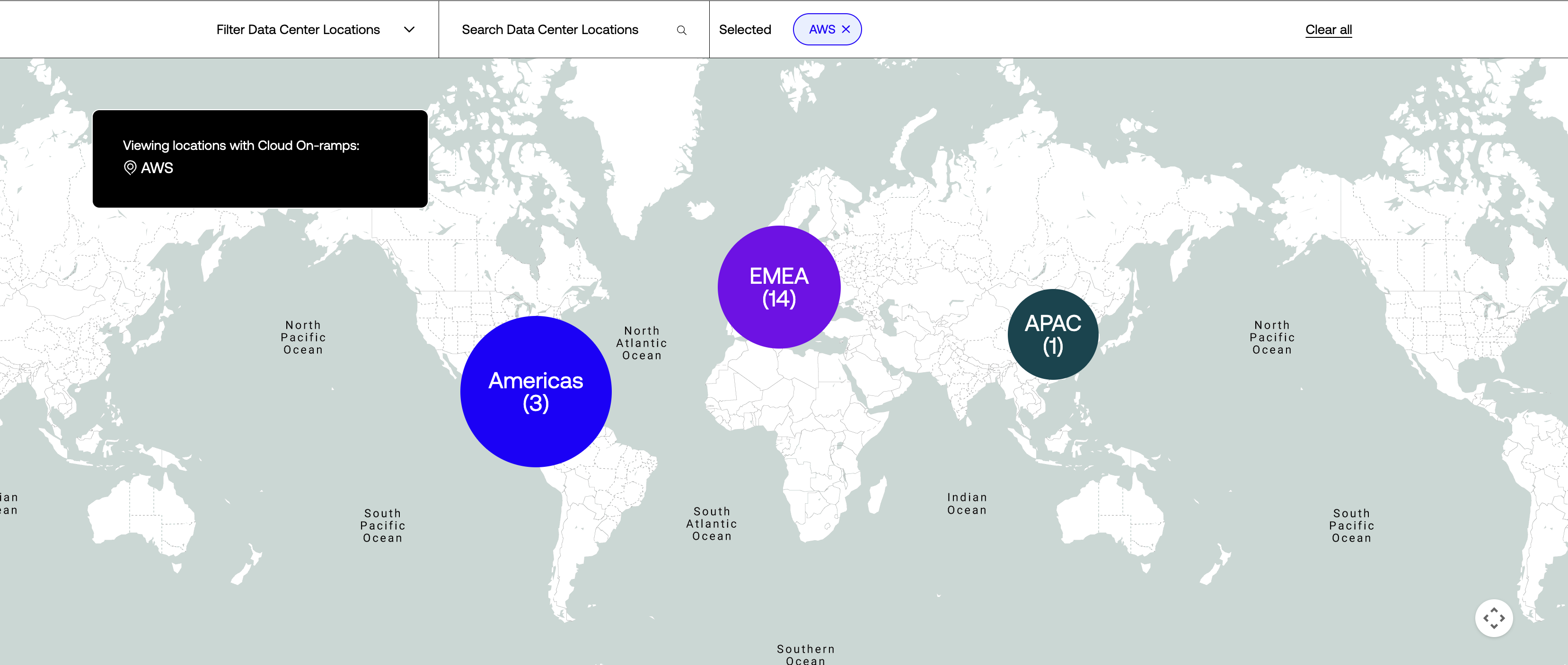
Within a year of the redesigned global map launching, a major competitor in the data center space adopted a strikingly similar map experience — including the global-to-regional navigation pattern, region labels matching Digital Realty's structure (Americas, EMEA, Asia-Pacific), metro-level drill-down with interactive markers, and popup cards prompting users to explore specific locations. The structural and interaction parallels extend well beyond coincidence.
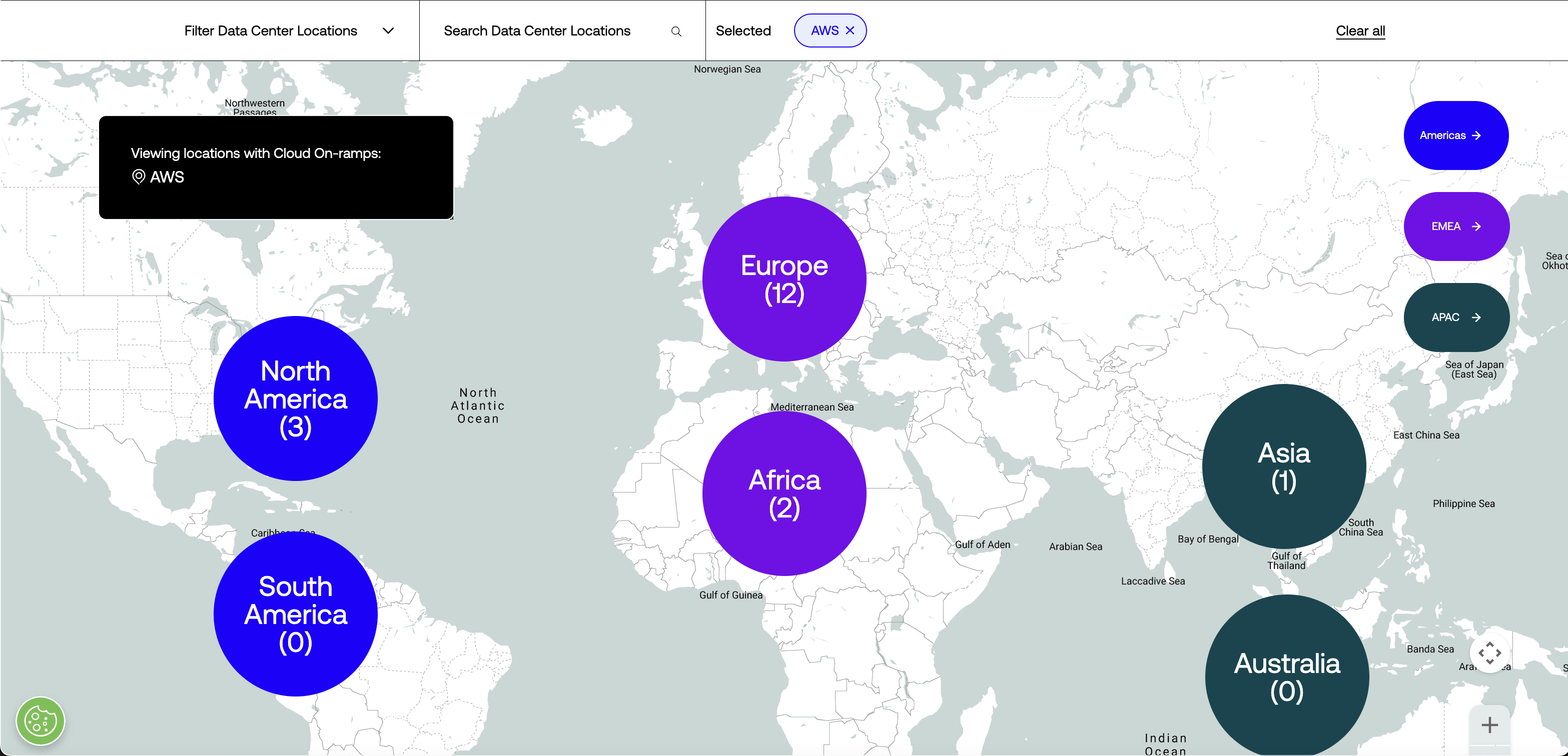
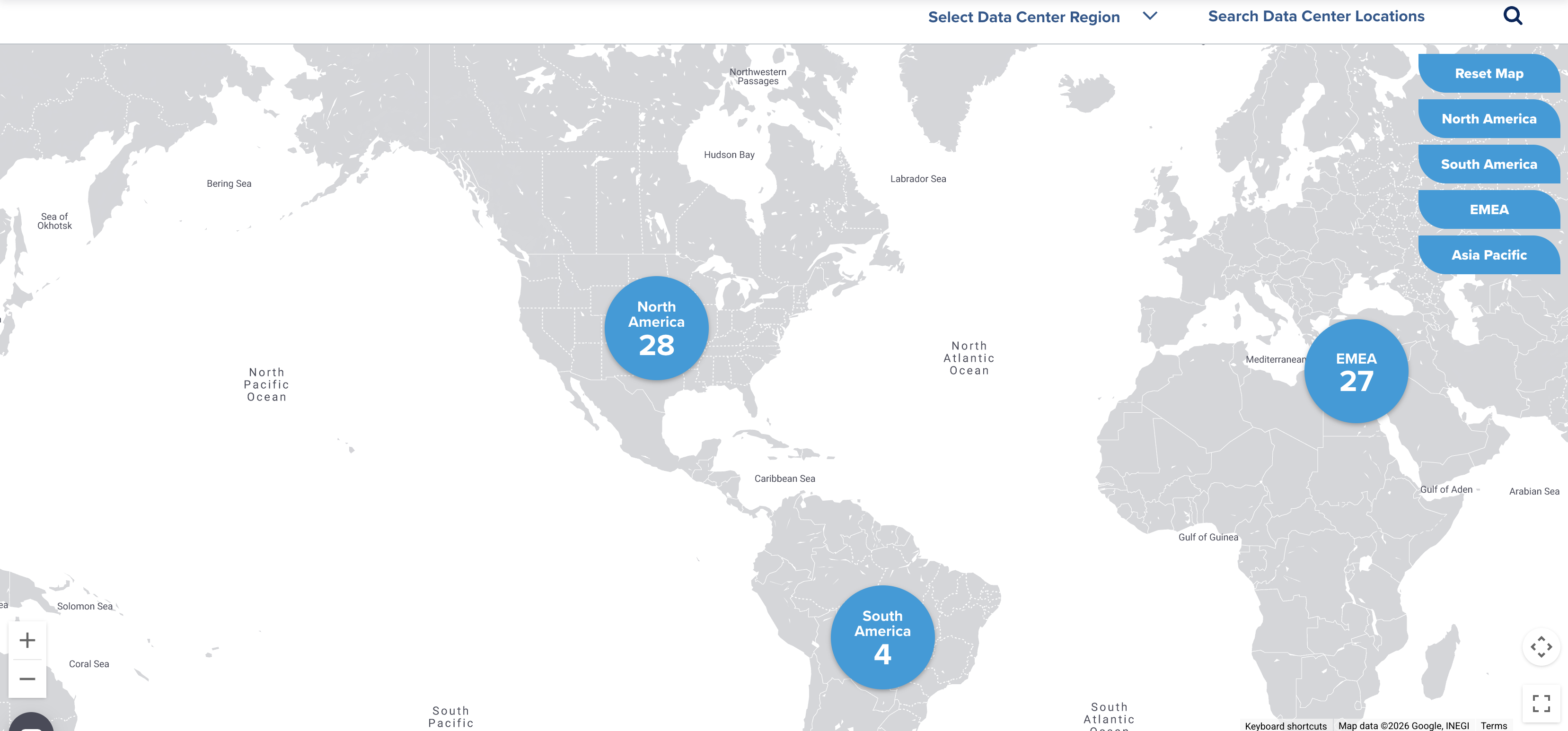
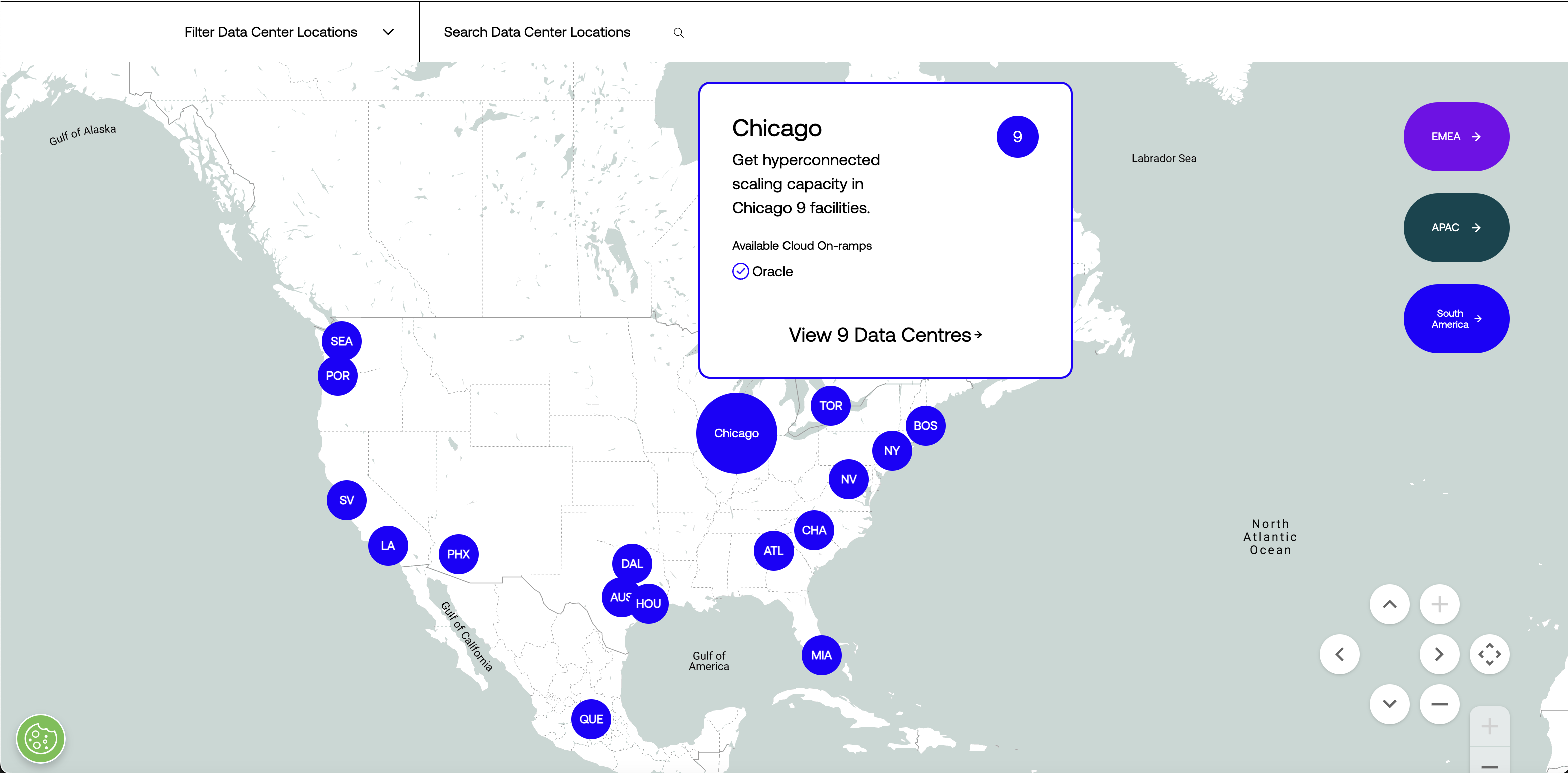
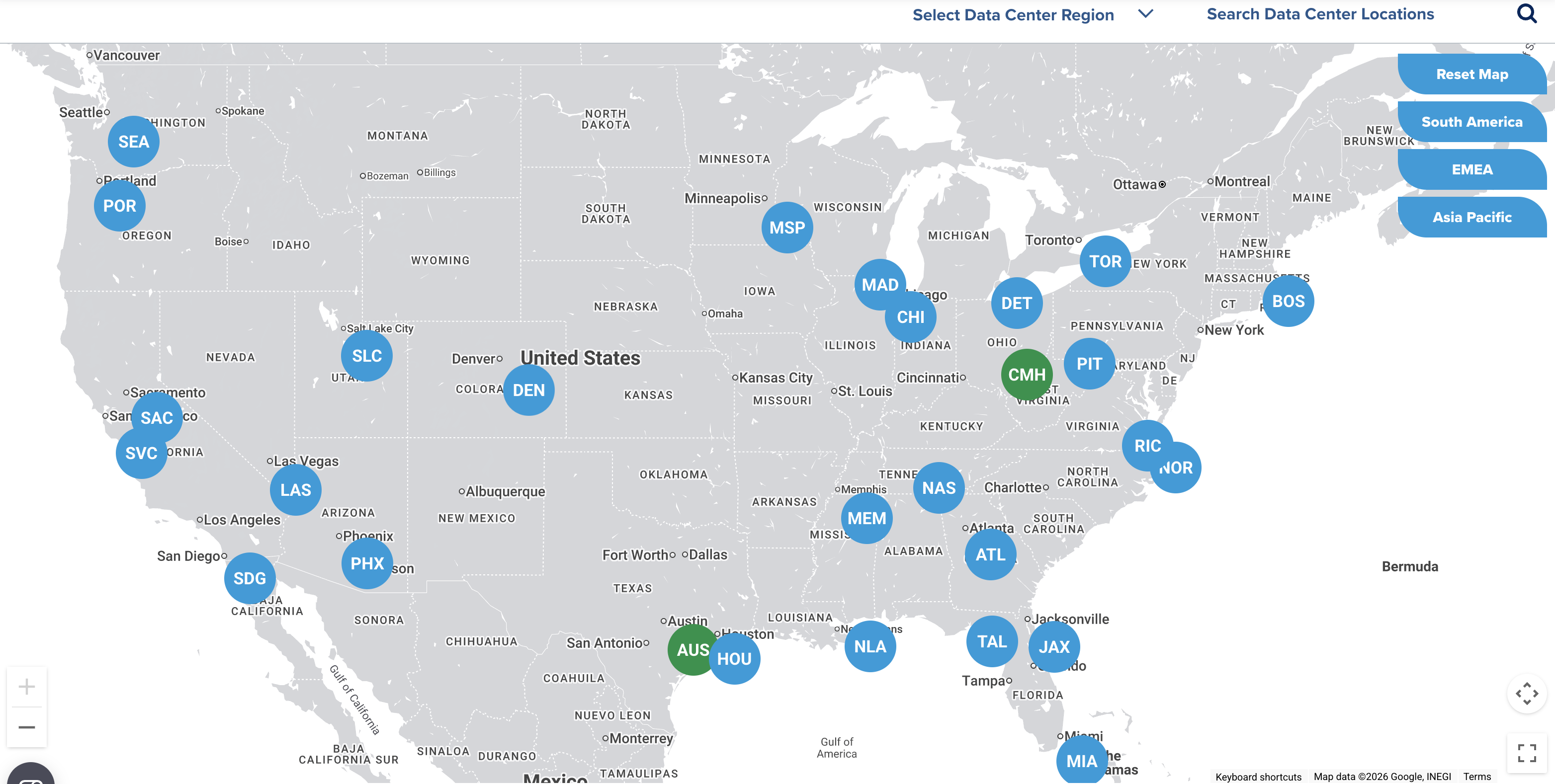
Metrics alone couldn't give us the validation of a near-verbatim industry competitor design copy.
- ❦ -
Metrics alone couldn't give us the validation of a near-verbatim industry competitor design copy.
- ❦ -
My Role
I led the UX design and technical artist functions across both phases of this project. That included user research and behavioral analysis through HotJar session recordings and Google Analytics, defining pain point and refinement hypotheses, writing the complete interaction specifications and acceptance criteria that served as the source of truth for development, creating 1-1, simulation-level Figma prototypes for desktop and mobile, leading a design agency and development team, and guiding the work through to flawless execution across all of Digital Realty's sites. The spec I wrote was viewed nearly 200 times by the team, the feature shipped to spec, the metrics proved the approach, and competitors followed.
Find me on